
With new AI frameworks, model updates, and prompt engineering techniques dropping (almost) every single week, we get this constant feeling of being behind. (I do, at least!).
Picture this scenario, which may sound familiar:
We spend hours tweaking a system prompt for your AI invoice extractor to fix one stubborn edge case, let’s say, around capturing certain date formats. We test it against a few sample emails, a true poor-man smoke test, it works and we open a Pull Request feeling proud of another problem solved.
The team approves it, merges it into main, and deploys it to staging.
Three days later, we get a new complaint from the users with a completely unrelated problem
The date fix worked, but the prompt became slightly more concise, causing the model to change its behavior around subjects unrelated to the fix.
In traditional backend engineering, this would never happen. A comprehensive suite of unit and integration tests in CI/CD would turn red, block the PR, and prevent the bug from ever reaching staging.
Yet in many AI projects today, teams are still evaluating prompts manually: tweaking text in a playground, spot-checking a couple of examples, and hoping for the best (guilty …).
At the end of our previous article on LLM-as-a-Judge, we left a small elephant in the room (as we almost always do): building a custom LLM judge script in pure Python was great for learning what evaluations actually do under the hood. But in a real-world engineering team, maintaining hundreds of lines of custom judge prompts, Chain-of-Thought parsing logic, and mock evaluators across multiple services is an operational headache nobody wants to maintain.
The way to improve this revolves around standardized metrics, and we need our test suite to run automatically on every single Pull Request—blocking regressions before code ever hits production.
In this third post of our AI Evals mini-series (part of the #AI for dummies series), we are going to learn:
- Why custom judge scripts fall short when scaling to teams, and why open-source eval frameworks like DeepEval exist.
- How G-Eval works and how to write production assertions for structured data factuality and schema correctness.
- How to build a fully automated CI/CD evaluation pipeline in GitHub Actions that gates Pull Requests based on AI quality thresholds.
- How to manage CI runtimes, token costs, and flakiness so your build pipeline stays fast and reliable.
Hand-Searching Luggage vs. The Automated Airport X-Ray Scanner
As usual, let’s start with an analogy.If you’ve been following this series you know I love them as a way to better frame a technical concept. Here is another one to help you frame your thinking.
Think of testing AI applications across your deployment lifecycle like baggage security at an international airport:
- Manual Playground Spot-Checking: Opening every suitcase by hand at the departure gate, glancing inside for five seconds, and hoping you didn’t miss any contraband. It’s slow, completely subjective, and unrepeatable.
- Custom Python Judge Script (Post #8): You built your own homemade metal detector from spare parts. It works, and it taught you how electromagnetism works, but you have to calibrate the wiring yourself, write custom alarms, and maintain it entirely solo.
- Automated CI/CD with an Eval Framework (DeepEval + CI/CD Actions): An industrial multi-spectral X-ray conveyor scanner stationed permanently at security control. Every single bag (Pull Request) passes through calibrated sensors automatically. If a prohibited item (a regression, a hallucination, or a broken JSON schema) is detected, the conveyor belt stops, alarms flash, and the bag is rejected before it ever reaches the airplane (production).
But why not just stick with the custom judge.py script we wrote in the last article?
Custom Python Judges vs. Open-Source Frameworks (DeepEval)
Building our own judge is the best way to learn the mechanics of Chain-of-Thought scoring and structured outputs. But when scaling across a team or multiple repositories, adopting a purpose-built framework like DeepEval offers significant advantages:
| Aspect | Custom Judge | Framework Approach (DeepEval) |
|---|---|---|
| Boilerplate & Maintenance | High: You maintain all prompt rubrics, schemas, and error handling. | Low: Import pre-built, peer-reviewed evaluation metrics out of the box. |
| Standard Metrics | Custom 1–5 rubrics only. | Rich library: G-Eval, Hallucination, Answer Relevancy, JSON Correctness, Faithfulness. |
| Test Runner Integration | Hand-rolled pytest assertions. | Native assert_test integration with rich terminal progress bars and debug logs (who doesn’t love some nice terminal fancy stuff) |
| CI/CD Integration | Basic exit codes. | Built-in JUnit reporting, GitHub Actions annotations, and web dashboard sync. |
| Parallel Execution | Requires manual asyncio or pytest-xdist configuration. | Built-in test parallelization to keep CI execution times manageable. |
The Real(ish)-World Scenario: Guarding our Invoice Extractor
As usual in this series, we will stick with our concrete, real(ish)-world scenario: Automating Expense & Invoice Data Extraction.
Recall our standard input vendor email:
Subject: Invoice INV-30455 from Acme Corp (Due Sept 21, '26)

Dear Valued Partner,

Attached please find the invoice #INV-30455 dated 2026-09-01. Kindly process the payment of 1,200.00€ at your earliest convenience. Note that this amount includes a 200€ tax. The due date for this invoice is September 21, 2026.

Description:
1. Software License Renewal - 1,000€
Tax: €200

Thank you for your continued partnership.
Warm regards,
Finance Team, Acme Corp
And our expected ground-truth structured extraction:
{
  "vendor_name": "Acme Corp",
  "invoice_id": "INV-30455",
  "total_amount": 1200.00,
  "tax_amount": 200.00,
  "due_date": "2026-09-21",
  "line_items": ["Software License Renewal - 1,000€"]
}
Our goal today: build a CI/CD pipeline that runs DeepEval against our golden dataset on every Pull Request, failing automatically if any prompt change introduces a quality regression.
Setting Up the Environment
Let’s create our requirements.txt file and install the dependencies into a clean virtual environment:
# requirements.txt
deepeval>=1.0.0
openai>=1.40.0
pydantic>=2.0.0
pytest>=8.0.0
python-dotenv>=1.0.0
Install them:
python -m venv venv
source venv/bin/activate

# On Windows: venv\Scripts\activate

pip install -r requirements.txt
Set up your .env configuration. DeepEval uses the standard OpenAI environment variables to query the judge model:
# .env
OPENAI_API_KEY=your_api_key_here
OPENAI_BASE_URL=https://openrouter.ai/api/v1
OPENAI_MODEL_NAME=openai/gpt-4o
Note: DeepEval uses
gpt-4oby default as its evaluation backbone, but because it respectsOPENAI_BASE_URL, you can point it to OpenRouter, an internal LiteLLM proxy, or any OpenAI-compatible provider.Also note this .env file is not committed, and these variables will be configured in GitHub later on.
The Code in Action
Our implementation consists of four clean, focused files:
schemas.py: The shared Pydantic invoice contract.extractor.py: The application pipeline under test.test_invoice_deepeval.py: The DeepEval test suite running factuality and schema assertions..github/workflows/ai_evals.yml: The GitHub Actions workflow automating the regression check.
1. The Shared Invoice Schema
First, we define our target schema in schemas.py. Notice how clear and typed it is:
# schemas.py
from pydantic import BaseModel, Field
from typing import List

class InvoiceExtraction(BaseModel):
    vendor_name: str = Field(description="Name of the vendor or issuing company")
    invoice_id: str = Field(description="Invoice identifier or reference number")
    total_amount: float = Field(description="Total monetary amount due")
    tax_amount: float = Field(default=0.0, description="Total tax or VAT included")
    due_date: str = Field(description="Due date normalized to YYYY-MM-DD, regardless of the format used in the email")
    line_items: List[str] = Field(default_factory=list, description="List of billed items or services")
2. The Extractor Pipeline
Next, extractor.py represents the actual AI application whose output we want to evaluate:
# extractor.py
import os
from dotenv import load_dotenv
from openai import OpenAI

from schemas import InvoiceExtraction

load_dotenv()

API_KEY = os.getenv("OPENAI_API_KEY")
BASE_URL = os.getenv("OPENAI_BASE_URL")
MODEL_NAME = os.getenv("OPENAI_MODEL_NAME")

client = OpenAI(
    api_key=API_KEY,
    base_url=BASE_URL
)

EXTRACTOR_SYSTEM_PROMPT = """
You are an AI Invoice Data Extractor. Read the vendor email and extract the invoice
details into structured JSON. Extract solely from the provided evidence: never
invent missing facts.
"""

def run_invoice_extractor(input_email: str) -> dict:
    """
    The extraction pipeline under evaluation: email text -> structured invoice JSON.
    """
    response = client.chat.completions.parse(
        model=MODEL_NAME,
        temperature=0.0,
        messages=[
            {"role": "system", "content": EXTRACTOR_SYSTEM_PROMPT.strip()},
            {"role": "user", "content": input_email.strip()}
        ],
        response_format=InvoiceExtraction
    )
    parsed = response.choices[0].message.parsed
    if parsed is None:
        raise RuntimeError(f"Extractor returned no structured output. Raw reply: {response.choices[0].message.content!r}")
    return parsed.model_dump()
3. Writing the DeepEval Test Suite
Now comes the star of the show: test_invoice_deepeval.py.
We combine two distinct evaluation metrics:
GEval: A state-of-the-art framework that uses an LLM with Chain-of-Thought reasoning to score custom criteria on a normalized scale from0.0to1.0. We use it to verify factual completeness and penalize hallucinations.JsonCorrectnessMetric: Ensures the generated output strictly complies with valid JSON structure.
# test_invoice_deepeval.py
import json
import os
from pathlib import Path
import pytest
from dotenv import load_dotenv

from deepeval import assert_test
from deepeval.test_case import LLMTestCase
from deepeval.test_case import SingleTurnParams
from deepeval.metrics import GEval, JsonCorrectnessMetric

from extractor import run_invoice_extractor
from schemas import InvoiceExtraction

load_dotenv()

HERE = Path(__file__).parent

# 1. Define custom G-Eval metric for Invoice Factuality & Completeness
invoice_factuality_metric = GEval(
    name="Invoice Factuality & Completeness",
    criteria=(
        "Evaluate whether the actual extracted JSON accurately reflects the vendor name, "
        "invoice ID, total monetary amount, tax amount, due date, and line items from the original email "
        "and matches the expected ground truth. Heavily penalize any hallucinated or modified numbers."
    ),
    evaluation_params=[
        SingleTurnParams.INPUT,
        SingleTurnParams.ACTUAL_OUTPUT,
        SingleTurnParams.EXPECTED_OUTPUT
    ],
    threshold=0.8  # Passing threshold (0.0 to 1.0)
)

# 2. Define JSON Format & Schema Compliance Metric
json_metric = JsonCorrectnessMetric(expected_schema=InvoiceExtraction, threshold=0.9)


def load_golden_dataset():
    data_path = HERE / "golden_dataset_synthetic.json"
    if not data_path.exists():
        raise FileNotFoundError(f"Dataset not found at {data_path}")
    return json.loads(data_path.read_text())


@pytest.mark.parametrize("case", load_golden_dataset())
def test_invoice_extraction_deepeval(case):
    """
    Evaluates invoice extraction across the golden dataset using DeepEval metrics.
    """
    input_email = case["input_email"]
    expected_output = case["expected_output"]

    # Run the extractor pipeline (system under test)
    actual_output = run_invoice_extractor(input_email)

    # Wrap the interaction into DeepEval's LLMTestCase
    test_case = LLMTestCase(
        input=input_email,
        actual_output=json.dumps(actual_output, indent=2),
        expected_output=json.dumps(expected_output, indent=2)
    )

    # Assert that both factuality and JSON schema meet our quality thresholds
    assert_test(test_case, [invoice_factuality_metric, json_metric])


if __name__ == "__main__":
pytest.main(["-v", __file__])4. Code Explanation
Let’s dissect what makes this test setup so effective:
GEval(Goal-Oriented Evaluation): Instead of writing raw judge system prompts by hand,GEvalautomatically generates an evaluation steps pipeline based on thecriteriastring and parameters you provide (INPUT,ACTUAL_OUTPUT,EXPECTED_OUTPUT). It grades output on a scale from 0.0 to 1.0.- Threshold = 0.8: Setting
threshold=0.8requires an 80% score to pass. This allows for slight cosmetic differences (e.g., formatting spacing or subtle phrasing variations in line items) while firmly failing on financial hallucinations or wrong invoice IDs. JsonCorrectnessMetric: Acts as our deterministic structural sanity check. If the LLM produces malformed JSON, markdown wrap errors, or incomplete braces, this metric catches it immediately before wasting cycles on semantic reasoning.assert_test: DeepEval’s replacement for standardassert. It runs all specified metrics against theLLMTestCase, prints human-readable reasoning logs to stdout when a test fails, and raises anAssertionErrorsopytestexits with code1.
Let’s See This Running Locally
Let’s run pytest in verbose mode against our 5 synthetic test cases. Make sure you get that golden dataset json file from the previous post.
(venv) carlos@t480:~/lab/blog/deepeval$ python -m pytest test_invoice_deepeval.py -v
============================================================== test session starts ===============================================================platform linux -- Python 3.14.4, pytest-9.1.1, pluggy-1.6.0 -- /home/carlos/lab/blog/deepeval/venv/bin/python
cachedir: .pytest_cache
rootdir: /home/carlos/lab/blog/deepeval
plugins: asyncio-1.4.0, repeat-0.9.4, deepeval-4.2.5, xdist-3.8.0, anyio-4.15.1, rerunfailures-16.7
asyncio: mode=Mode.STRICT, debug=False, asyncio_default_fixture_loop_scope=None, asyncio_default_test_loop_scope=function
collected 5 items
test_invoice_deepeval.py::test_invoice_extraction_deepeval[case0] PASSED                                                                   [ 20%]
test_invoice_deepeval.py::test_invoice_extraction_deepeval[case1] PASSED                                                                   [ 40%]
test_invoice_deepeval.py::test_invoice_extraction_deepeval[case2] PASSED                                                                   [ 60%]
test_invoice_deepeval.py::test_invoice_extraction_deepeval[case3] PASSED                                                                   [ 80%]
test_invoice_deepeval.py::test_invoice_extraction_deepeval[case4] PASSED                                                                   [100%] Running teardown with pytest sessionfinish...

=============================================================== 5 passed in 19.78s ===============================================================All 5 test cases passed. All good.
But what happens when an engineer introduces a regression?
Now, let’s see what happens if someone modifies the prompt in extractor.py to be “ultra-fast and concise”, accidentally causing it to drop tax_amount and output tax_amount: 0.0 when tax was clearly stated (simulated output):
=========================================================== FAILURES ===========================================================_______________________________________ test_invoice_extraction_deepeval[case0] ________________________________________

AssertionError: Metric [Invoice Factuality & Completeness] failed:
Score: 0.60 (Threshold: 0.80)
Reason: The actual output extracted a tax amount of 0.0, whereas the email explicitly states a tax of 200.00€ included in the total 1,200.00€. This is a factual discrepancy on a key financial field.

====================================================== 1 failed, 4 passed in 18.15s ============================================Look at that output: the test didn’t just fail; it provided an explicit, actionable diagnosis: “The actual output extracted a tax amount of 0.0, whereas the email explicitly states a tax of 200.00€”. No digging through logs required.
Wiring it into GitHub Actions
Now that our test suite runs locally, let’s automate it so that no Pull Request can be merged into production unless all AI evals pass.
Create a new file in your repository at .github/workflows/ai_evals.yml:
# .github/workflows/ai_evals.yml
name: AI Evals Regression Pipeline

on:
  pull_request:
    branches: [ main, master ]
  workflow_dispatch:

jobs:
  run-ai-evals:
    name: Run DeepEval Regression Suite
    runs-on: ubuntu-latest

    steps:
      - name: Checkout Code
        uses: actions/checkout@v4

      - name: Set up Python 3.11
        uses: actions/setup-python@v5
        with:
          python-version: '3.11'
          cache: 'pip'

      - name: Install Dependencies
        run: |
          python -m pip install --upgrade pip
          pip install -r requirements.txt

      - name: Execute AI Evaluation Suite
        env:
          OPENAI_API_KEY: ${{ secrets.OPENAI_API_KEY }}
          OPENAI_BASE_URL: ${{ secrets.OPENAI_BASE_URL }}
          OPENAI_MODEL_NAME: ${{ secrets.OPENAI_MODEL_NAME }}
        run: |
          pytest test_invoice_deepeval.py -v
Configuring GitHub Secrets
For the pipeline to connect to your inference provider, add your credentials in GitHub:
- Navigate to your repository on GitHub.
- Click on Settings → Secrets and variables → Actions.
- Add
OPENAI_API_KEY,OPENAI_BASE_URL(e.g.https://openrouter.ai/api/v1), and optionallyOPENAI_MODEL_NAME.
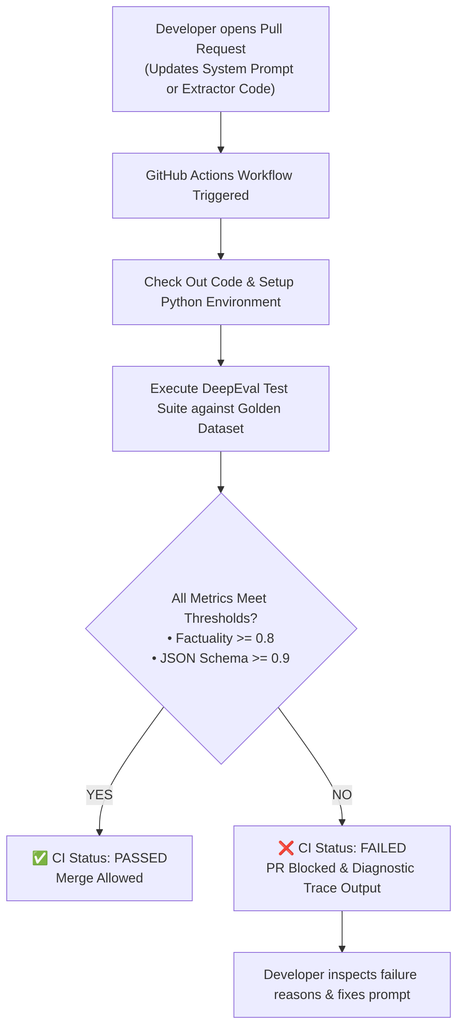
Now, whenever an someone opens a Pull Request changing a system prompt, modifying an extraction model, or altering temperature parameters:
- GitHub Actions spins up an isolated Ubuntu runner.
- It executes your DeepEval test suite against your golden benchmark dataset.
- If an extraction regression drops factuality below
0.8, the check turns red (❌) and GitHub blocks the “Merge” button!
Here, I’ve created a branch where I purposely modified the golden dataset to cause an issue, and here’s the result:
https://github.com/CarlosRodrigues/DeepEval-CICD/actions/runs/35791123140/job/106959589194
Clean, simple, and maintainable.
Know Your CI/CD Limits: Practical Gotchas
Automating AI evals in CI/CD is a game changer, but running LLMs inside build pipelines introduces challenges that traditional unit tests never had. Here are four practical gotchas you should plan for early:
1. The Build Time & Cost Trap
If your golden dataset has 200 test cases, running live LLM extraction plus LLM evaluation on every single commit means 400 API calls per push. That can easily cost several dollars per run and take 10+ minutes, unless you’re running local inference.
- The Fix: Don’t run the entire 200-case suite on every push. Run a quick smoke test (5–10 representative cases) on draft PRs, and run the full 200-case golden benchmark only when the PR is marked “Ready for Review” or against the
mainbranch nightly or whenever your cadence justifies.
2. Guarding against Flakiness
Even at temperature=0.0, LLM responses can exhibit slight nondeterminism due to GPU kernel batching or inference routing across provider clusters.
- The Fix: Never assert on exact equality (
assert score == 1.0). Use realistic thresholds (threshold=0.8) and always verify that deterministic checks (JSON validity, float tolerances) pass first.
3. Path Filtering in GitHub Actions
Don’t waste API calls running LLM evals when someone only modified a README.md or a CSS file.
- The Fix: Use GitHub Actions
pathsfiltering to trigger the workflow only when relevant files change:on: pull_request: paths: - 'prompts/**' - 'extractor/**' - 'golden_dataset*.json'
4. Secret Security on Forked Repositories
If your repository is open source, GitHub Actions by default disables repository secrets on Pull Requests created from public forks to prevent credential theft.
- The Fix: For public repositories, use mock evaluators (like the
evaluate_extraction_mockfrom Post #8) for fork PRs, or gate live API evaluation behind an environment approval check.
What’s Next?
With DeepEval and GitHub Actions in place, you now have an automated safety net protecting your staging and production environments from prompt regressions.
Pre-deployment testing (Offline Evals) guarantees that your pipeline behaves properly on your benchmark datasets.
However, real users submit weird, unpredictable emails that your test dataset might never have anticipated. Once your code hits production, how do you know if real-world accuracy starts degrading?
In the fourth and final post of our AI Evals mini-series, we’ll explore Online Evals & Production Monitoring: how to sample live user traffic asynchronously, capture implicit feedback, and catch model drift in real time without adding user latency or breaking the bank.
Stay tuned!
Cheers 🙂
P.S: Here’s the companion Repo: https://github.com/CarlosRodrigues/DeepEval-CICD
Be First to Comment